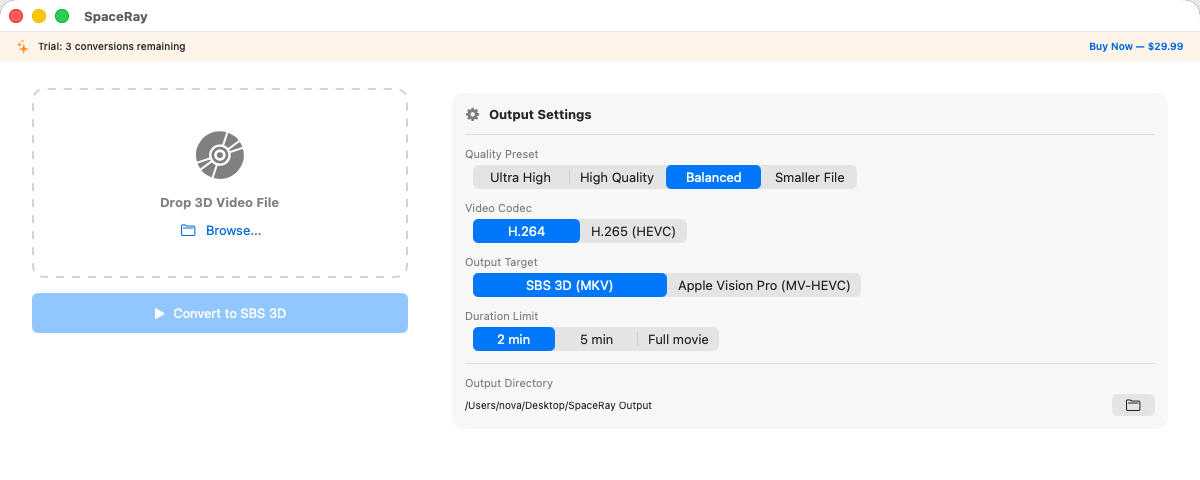
SpaceRay converts MVC-encoded 3D video into MV-HEVC spatial video for Apple Vision Pro — or Side-by-Side 3D for Meta Quest 3, Quest Pro, Pico, and just about every other VR headset. Drop in an MKV or M2TS — pick your output. One click.
Version 1.0.15
Preview
Drop in your 3D MKV or M2TS file and SpaceRay handles the rest — outputting ready-to-watch spatial video.
Compatibility
SpaceRay outputs both MV-HEVC spatial video and Side-by-Side 3D. Convert once, watch on whichever headset you have in front of you.
Native spatial video. Plays directly in the Photos app and TV app with full stereoscopic depth. No sideloading, no workarounds — just AirDrop the file to your headset.
Standard Side-by-Side 3D, compatible with virtually every VR headset that plays stereoscopic video. Works with Skybox VR, Moon VR Player, DeoVR, Pigasus, and any SBS-capable video app.
Features
Professional-grade 3D to spatial video conversion, made simple.
Drop your MKV or M2TS file, SpaceRay handles the rest. Automatically detects MVC 3D tracks and dual-stream stereoscopic structures.
MV-HEVC for Apple Vision Pro's native spatial video. SBS 3D for Quest 3, Pico, and most other VR headsets. Pick either — or both — per conversion.
Hardware-accelerated H.265 encoding on Apple Silicon. Quality presets from Balanced to Ultra High — you choose the quality.
Queue up your entire collection, convert overnight. Process multiple files sequentially with automatic queue management.
Convert the same file to both MV-HEVC and SBS in a single pass. One 3D library, playable on every headset you own.
Everything runs locally on your Mac, your movies never leave your machine. Fully offline — no network required.
Trust
SpaceRay is designed with privacy at its core. Video processing should be private — here's our commitment.
No data collection. No network calls for processing. SpaceRay runs entirely on your Mac, converting video locally using Apple's hardware encoders. Nothing is sent to any server — ever. Your 3D video files stay on your machine.
Pricing
One price. Everything included. No subscription, ever.
7-day money-back guarantee · One-time · No subscription
FAQ
You need your 3D content in an MKV or M2TS file with an MVC (Multiview Video Coding) 3D track. Open SpaceRay, drag in your file, and choose MV-HEVC as the output format. SpaceRay automatically detects the dual-stream 3D structure, handles the MVC codec decoding, and encodes it into the MV-HEVC spatial video format that Apple Vision Pro plays natively. The entire conversion runs locally on your Mac using hardware-accelerated encoding.
MV-HEVC (Multiview High Efficiency Video Coding) is Apple's chosen format for spatial video on Vision Pro. It stores separate left-eye and right-eye views in a single file, allowing Vision Pro to render true stereoscopic 3D. Unlike older 3D formats like Side-by-Side or frame-packed, MV-HEVC is the only format that plays as native spatial video in the Vision Pro Photos and TV apps. SpaceRay is an MV-HEVC converter for Mac that handles this conversion automatically, taking your MVC-encoded 3D source and outputting a ready-to-play spatial video file.
SpaceRay supports MKV files containing MVC (Multiview Video Coding) 3D tracks and M2TS files. SpaceRay automatically detects the stereoscopic structure within your files — whether it's frame-packed, MVC base+dependent, or side-by-side — and converts it to MV-HEVC spatial video for Apple Vision Pro or SBS 3D for other headsets.
No. SpaceRay runs entirely offline on your Mac. All video decoding and MV-HEVC encoding happens locally using your Mac's hardware video encoders — nothing is uploaded to any server. Your 3D video files never leave your machine. The only time SpaceRay connects to the internet is for optional license validation when you first activate your purchase. After that, it works completely offline.
Yes. SpaceRay can output standard Side-by-Side (SBS) 3D video in addition to MV-HEVC spatial video. SBS output works with Meta Quest 3, Quest Pro, and virtually any VR headset that supports 3D video playback. You can convert the same 3D source file to both formats — MV-HEVC for your Apple Vision Pro and SBS for your Quest 3 — so your entire 3D video library is accessible on whichever headset you prefer.
Conversion time depends on your Mac's hardware and the quality preset you choose. On an Apple Silicon Mac (M1 or later), a typical 2-hour 3D movie converts in roughly 30–60 minutes using the Balanced preset, thanks to hardware-accelerated H.265 encoding. The Ultra High quality preset takes longer but produces the best possible output. SpaceRay supports batch processing, so you can queue up your entire 3D video library and let it convert overnight.
Convert once. Watch on Vision Pro, Quest 3, or whatever headset you pick up next. One-time purchase, no subscription.
Buy Now — $29.99macOS 14 Sonoma or later · Apple Silicon required · Requires MKV/M2TS source